Shopify Email Deliverability Before BFCM 2026: SPF, DKIM, DMARC and One-Click Unsubscribe
Gmail, Yahoo and Outlook now reject non-compliant bulk email instead of filtering it. Here is the technical checklist every Shopify store should finish before Black Friday 2026.
8 min read
Black Friday is the week your store sends the most email of the year, to the largest audience, with the most money riding on each message. It is also the week when a missing DNS record or a spike in spam complaints costs the most. This guide covers what mailbox providers require in 2026, how to check your setup, and what to finish in October so nothing breaks on November 27.
What changed: rejection instead of the spam folder
The rules are not new. Gmail and Yahoo published their bulk sender requirements in late 2023 and began enforcing them in February 2024. What changed is how strictly they are applied:
- Gmail moved from temporary deferrals to permanent rejections in November 2025. Non-compliant messages now bounce with a 5xx error before they reach any folder.
- Microsoft adopted equivalent rules for Outlook.com, Hotmail and Live addresses in May 2025, rejecting non-compliant bulk mail with a
550 5.7.515error. - Yahoo and AOL follow rules that closely mirror Google's.
⚠️
BFCM 2026 is the first Black Friday where the main consumer inboxes reject non-compliant marketing email outright. Last year a weak setup meant lower open rates. This year it can mean campaigns that never arrive.
Do the bulk sender rules apply to your store?
Google and Microsoft define a bulk sender as a domain that sends around 5,000 or more messages per day to their users. Many stores sit well below that most of the year, then cross it during a BFCM campaign. Once Gmail classifies a domain as a bulk sender, that status does not expire when volume drops again.
Even below the threshold, the same practices protect your inbox placement. Treat the requirements as the baseline for any store that sends marketing email.
The 2026 requirements in one table
| Requirement | Gmail | Yahoo | Outlook consumer |
|---|---|---|---|
| SPF and DKIM | Required | Required | Required |
DMARC policy (p=none minimum) | Required | Required | Required |
| From domain aligned with SPF or DKIM | Required | Required | Required |
| One-click unsubscribe on marketing mail | Required | Required | Expected |
| Spam complaint rate | Under 0.3% | Under 0.3% | Low and stable |
| Valid forward and reverse DNS, TLS | Required | Required | Required |
📏
0.3% is the enforcement line, not a target. Google recommends staying below 0.1%. If you see 0.2% in the weeks before Black Friday, fix it before you increase volume.
Step 1: authenticate your sending domain
Authentication proves that the email claiming to come from your brand actually does. Three DNS records do the work.
SPF
SPF lists the servers allowed to send for your domain. You only get one SPF record per domain, and it can trigger at most 10 DNS lookups. Stores that stack Google Workspace, a helpdesk, an ESP and a review app often exceed that limit without noticing.
example.com. TXT "v=spf1 include:_spf.google.com include:sendgrid.net ~all"DKIM
DKIM signs each message with a private key. Your email platform gives you the public key as a CNAME or TXT record. Use 2048-bit keys where the provider supports them.
s1._domainkey.example.com. CNAME s1.domainkey.u12345.wl.sendgrid.net.DMARC
DMARC tells receivers what to do when SPF or DKIM fails, and sends you reports. Start at p=none with reporting, read the reports for a few weeks, then move towards quarantine.
_dmarc.example.com. TXT "v=DMARC1; p=none; rua=mailto:dmarc@example.com; adkim=r; aspf=r"🛑
Do not jump to p=reject in October. If an app you forgot about sends order emails from your domain without proper signing, a strict policy will block them during your busiest week. Tighten the policy in January, once BFCM data is in.
Alignment is the part people miss
DMARC passes only when the domain in your visible From address matches the domain authenticated by SPF or DKIM. An email from hello@yourbrand.com signed only by yourplatform.com fails alignment. That is why a verified custom sending domain matters: it signs your mail with your own domain.
Step 2: make unsubscribing effortless
Marketing emails must support one-click unsubscribe through the List-Unsubscribe and List-Unsubscribe-Post headers, and process requests within two days. A visible unsubscribe link in the footer is still required.
List-Unsubscribe: <https://example.com/unsubscribe?u=8f2a>, <mailto:unsub@example.com>
List-Unsubscribe-Post: List-Unsubscribe=One-Click
Most email platforms add these headers for you, but check a real message: in Gmail, open the three-dot menu, choose Show original, and look for both headers.
The business case is simple. A customer who cannot find the unsubscribe link reports spam instead, and spam reports are what push your complaint rate towards the 0.3% line.
Step 3: control your complaint rate before you scale volume
Complaint rate is the signal that usually breaks BFCM campaigns, because stores email people who have not heard from them in months.
- Suppress profiles with no opens or clicks in the last 180 days from BFCM campaigns, or send them a separate re-permission email first.
- Remove hard bounces and role addresses such as info@ or admin@ from marketing lists.
- Only email customers who gave marketing consent. Shopify stores consent on the customer record, so respect it everywhere.
- Send from a real reply-to address, not noreply. Replies are a positive reputation signal.
- Keep the From name consistent so subscribers recognize you in a crowded inbox.
Step 4: warm up volume through October
Mailbox providers trust consistent senders. A domain that sends 2,000 emails a week and then 80,000 on Black Friday morning looks like a compromised account.
- Early October: confirm authentication, set up Google Postmaster Tools and Yahoo Sender Hub, and get a baseline complaint rate.
- Mid October: send regular campaigns to your engaged segment and keep automated flows running so volume is steady.
- Late October to mid November: increase volume gradually, roughly 20 to 30% per week, widening the audience from most to least engaged.
- BFCM week: send to the audience you have already warmed. Avoid adding a new sending domain, IP or platform.
Step 5: monitor during peak
- Google Postmaster Tools: domain reputation, spam rate and authentication results for Gmail recipients.
- Yahoo Sender Hub: complaint feedback for Yahoo and AOL.
- Your platform's send log: bounce codes tell you exactly what went wrong. A spike in 5xx bounces from one provider points to an authentication or reputation problem, not a content one.
- DMARC aggregate reports: surface unknown services sending as your domain.
Transactional and marketing mail on the same domain
Order confirmations and shipping updates are your most important emails. If marketing campaigns damage the reputation of the domain they share, receipts can land in spam too. Larger senders separate the streams with a subdomain, for example mail.yourbrand.com for marketing and the root domain for transactional mail, each with its own DKIM key.
For smaller stores a single well-maintained domain is fine. What matters is that every service sending as your brand is authenticated and aligned.
Where EmailOS fits
EmailOS, our Shopify email automation app, adds one-click unsubscribe to marketing emails and respects Shopify marketing consent by default. The free trial sends from the shared EmailOS domain, which is useful for testing flows. For BFCM volume we recommend the Plus or Pro plan with your own verified sending domain, so the reputation you build in October belongs to your brand.
If you run several platforms and are not sure which ones send as your domain, a technical audit of DNS and email infrastructure is a fast way to find out. The rest of your peak preparation is in our BFCM 2026 Shopify engineering checklist.
Pre-BFCM deliverability checklist
- SPF record exists, is unique and stays under 10 lookups.
- DKIM is enabled with your own domain on every service that sends marketing or transactional mail.
- DMARC is published with at least
p=noneand reporting enabled. - Your From domain aligns with SPF or DKIM.
- One-click unsubscribe headers appear on a real marketing message.
- Complaint rate in Postmaster Tools is below 0.1%.
- Unengaged and bounced profiles are suppressed from BFCM sends.
- Volume has been ramped gradually since early October.
- No new sending domain or platform goes live after November 1.
FAQ
Do these rules apply if I send fewer than 5,000 emails a day?
The strictest requirements target bulk senders, but SPF, DKIM, a valid DMARC record and easy unsubscribing improve inbox placement at any volume. Many stores also cross the threshold for the first time during BFCM.
Is BIMI worth setting up before Black Friday?
Not as a priority. BIMI shows your logo in supported inboxes, but it requires DMARC enforcement and usually a paid certificate. Finish authentication and list hygiene first.
Should I change email platforms in November?
We advise against it. A new platform or sending domain has no reputation history, and BFCM volume is the worst moment to build one. Make changes in October or wait until January.
What is a safe spam complaint rate?
Aim for under 0.1%. Gmail and Yahoo enforce at 0.3%, and recovery from a damaged reputation can take weeks.
How do I see why emails bounced?
Read the SMTP response code in your platform's send log. Codes in the 5.7.x range usually mean authentication or policy failures, while 4.x.x codes are temporary deferrals that often signal reputation problems.
Related posts
View all articles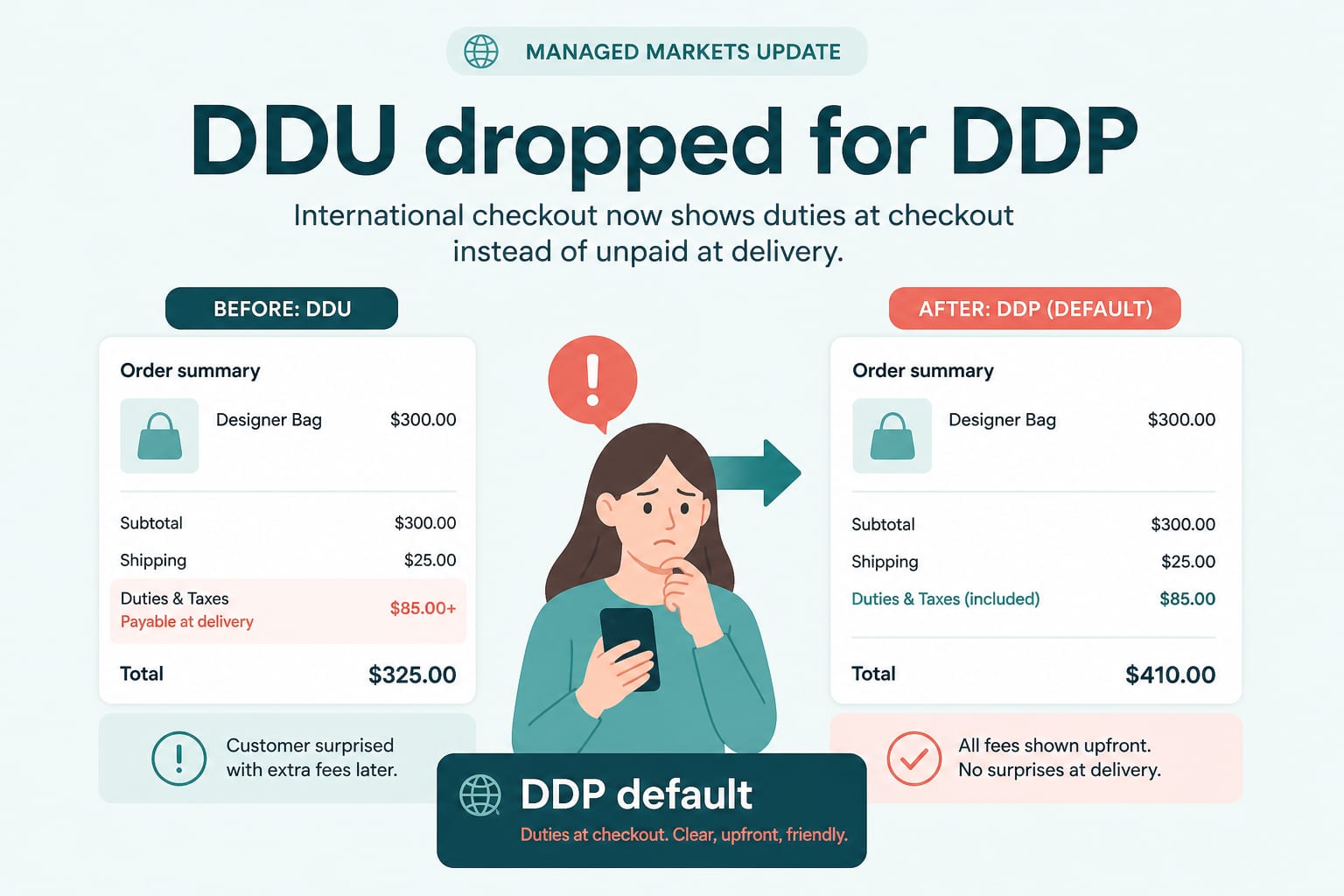
Ecommerce DevelopmentSep 15, 2026
DDP by Default: What Managed Markets Dropping DDU Means for Cross-Border Pricing
On 24 August, Shopify Managed Markets stopped supporting Delivered Duty Unpaid in regions where it supports DDP. Duties now land at checkout. Here is what that changes for landed cost, conversion and margin.
6 min read
Data AnalyticsAug 18, 2026
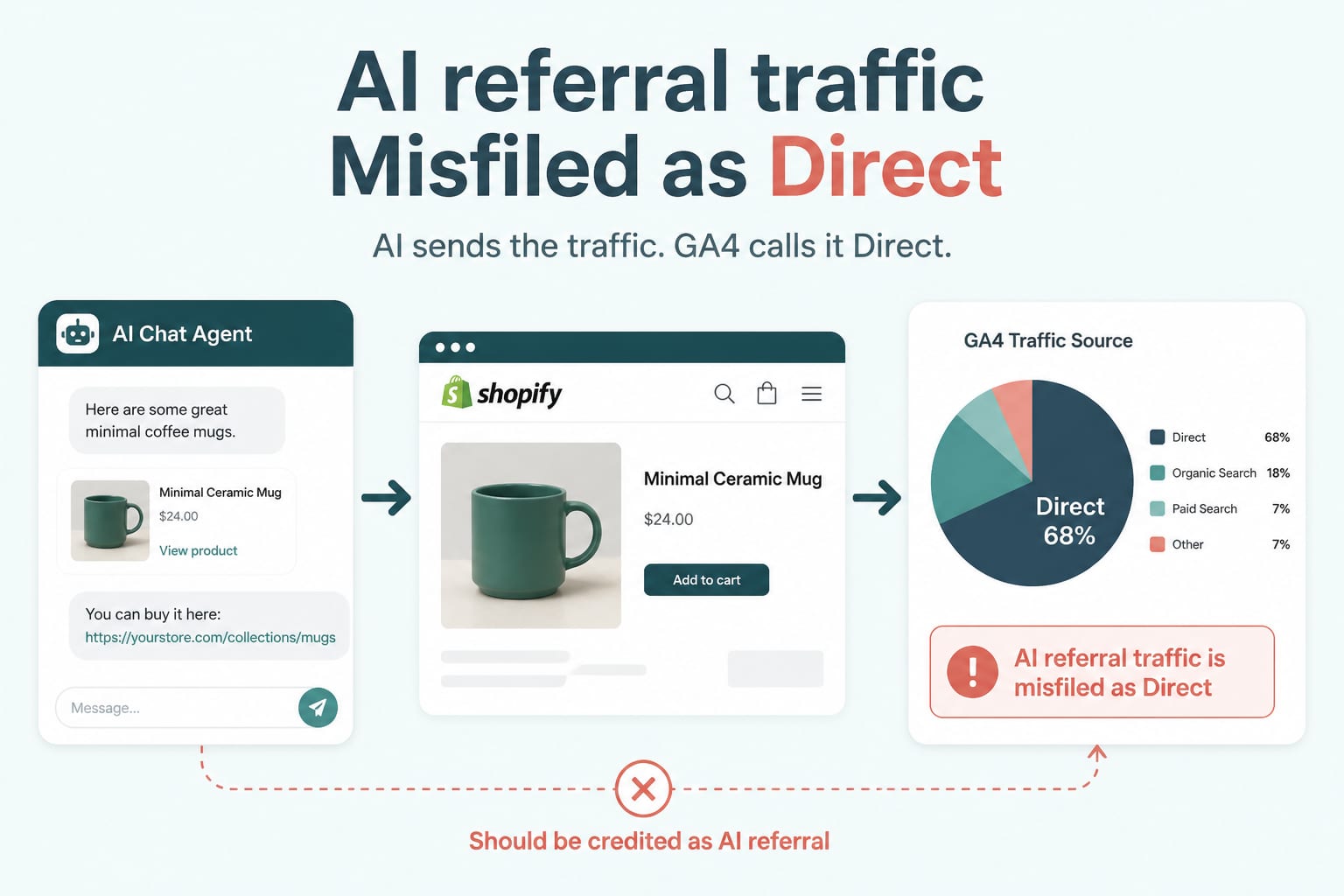
Your AI Referral Traffic Is Being Misattributed: Fixing GA4 for Agent-Sent Buyers
AI referrals grew sharply through 2026 and convert above average, but most stores cannot see them because default analytics files them as direct. Here is how to build a channel group that actually reports them.
6 min read
Technical SEOJul 21, 2026
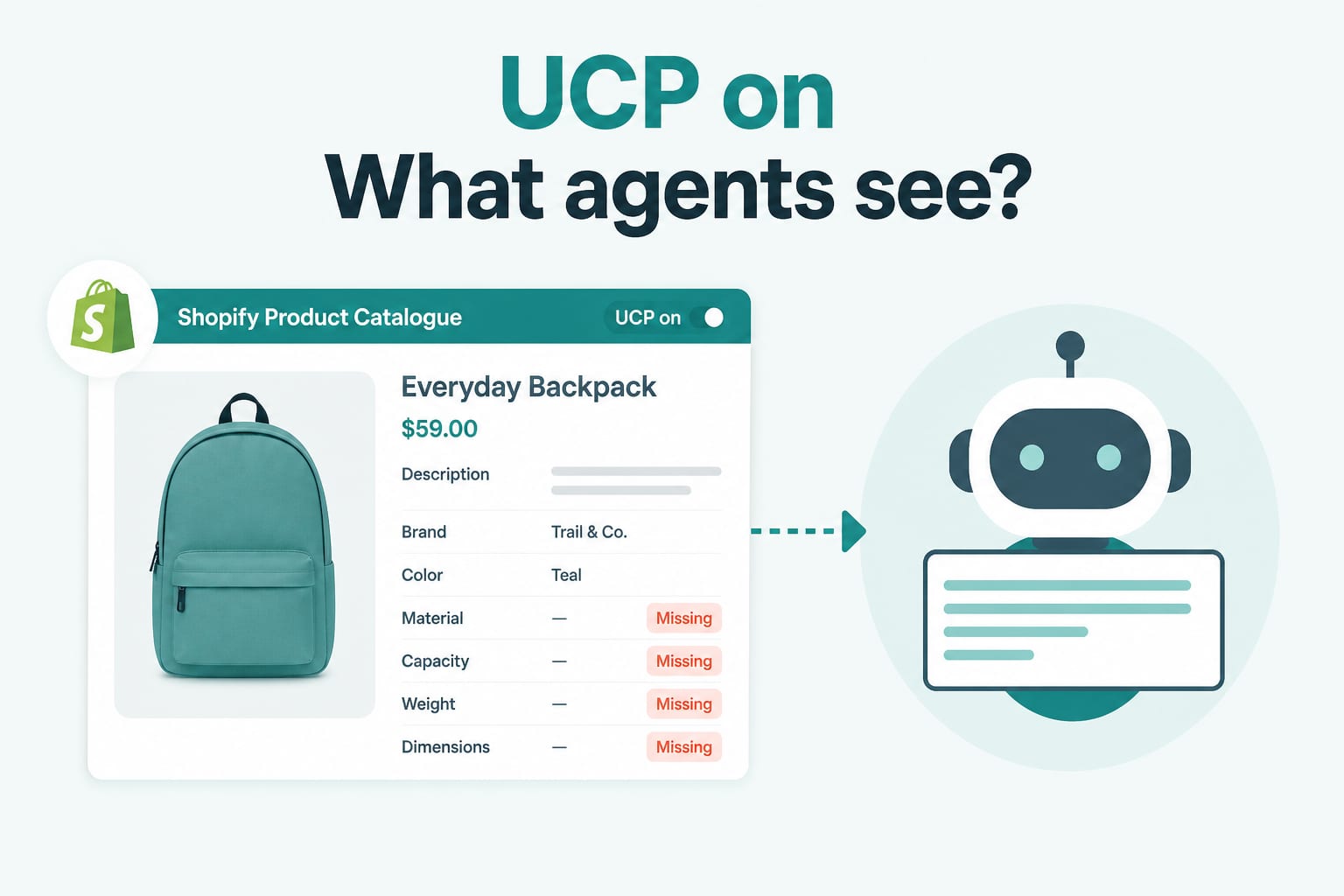
UCP Is On by Default: Is Your Shopify Catalogue Ready for AI Agents?
Summer '26 turned on the Universal Commerce Protocol for every Shopify store and added an Agentic section to the admin. Your products are already exposed to AI shopping agents. Here is how to audit what they actually see.
7 min read